May 27, 2026 · 6 min
Turn your Hermes Agent into a Telegram bot
Archive. Written when meraGPT hosted Hermes Agent on managed boxes. That service ended on 2 September 2026, but Hermes is open source, so this still works if you run it yourself. What meraGPT does now.
One of the best reasons to host your own Hermes Agent is that it stops living inside a browser tab. Hermes ships with a messaging gateway for half a dozen chat apps. Telegram is the quickest one to set up: a bot token, two config edits, and your agent is reachable from any phone with no app to install.
This is the actual end-to-end walkthrough, from creating the bot in Telegram to having a real conversation with your agent on the way to work. Assumes you already have a meraGPT box running. If not, the Quickstart gets you there in about three minutes.
1. Create the Telegram bot
Open Telegram and start a chat with @BotFather. Type /newbot. BotFather asks for a display name (any string) and a username (must end in bot). When it’s done it replies with a token that looks like 1234567890:AAH.... Copy it somewhere safe; you’ll paste it into Hermes in a moment.
While you’re still in Telegram, message @userinfobot and it’ll reply with your numeric user ID (looks like 549267219). Hermes uses that as the allow-list so only you can talk to the bot.
2. Paste the token into Hermes
Open your meraGPT dashboard, click CHANNELS in the sidebar (this is the new admin panel that landed in Hermes v0.16; the older KEYS → MESSAGING sub-tab is gone). Find the Telegram row and click Configure.
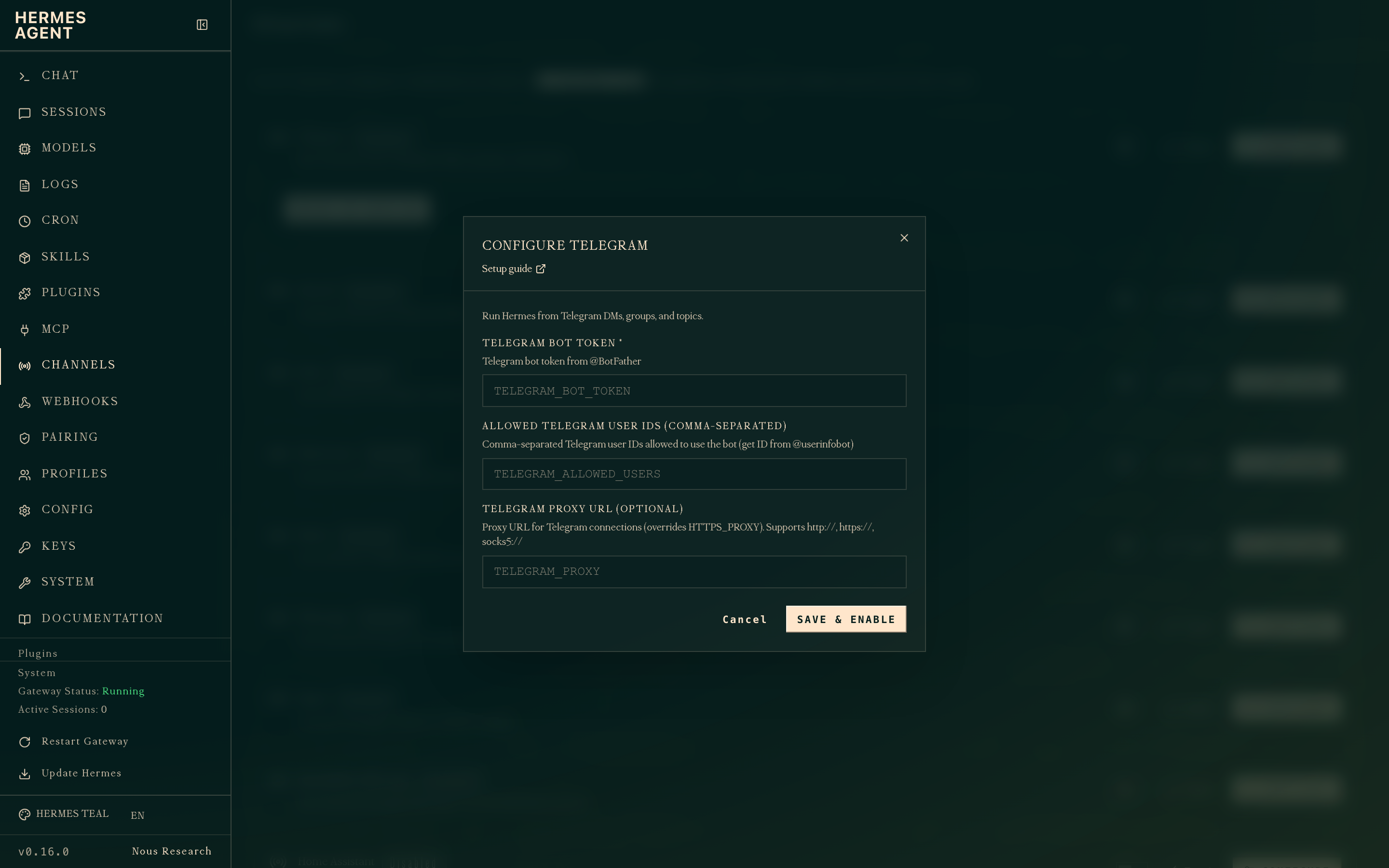
TELEGRAM_BOT_TOKEN, the user ID into TELEGRAM_ALLOWED_USERS, hit Save & enable.The gateway picks the change up within a couple of seconds. The Telegram row flips from Disabled to Enabled and you don’t need to restart anything manually. (If you’re curious about the full Channels page, the docs walk through every platform.)
3. Say hi
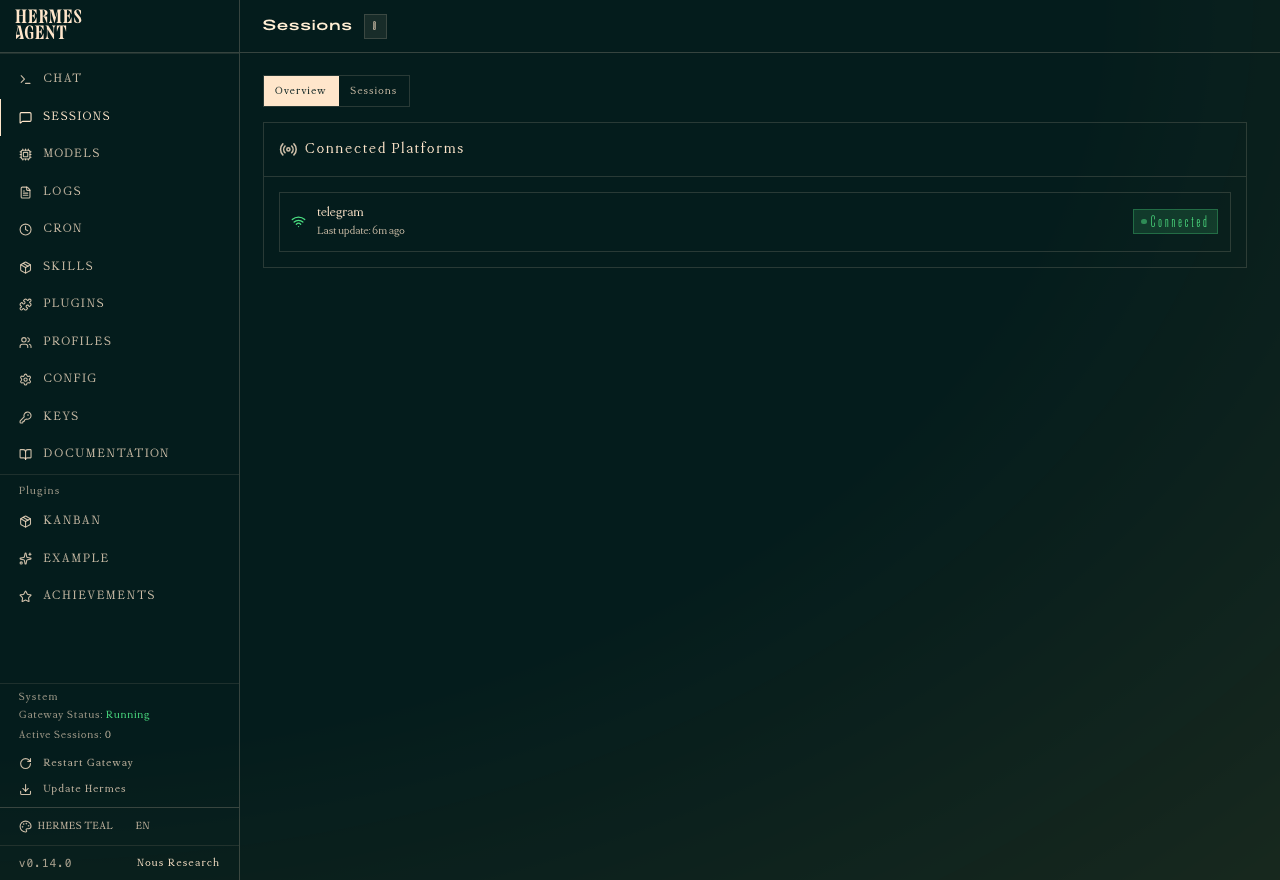
Find your bot in Telegram (search its username) and send any message. Within a couple of seconds you’ll get a streaming reply — same Hermes you’ve been chatting with in the web dashboard, same memory, same skills, same slash commands. Back in the dashboard, the Sessions view now lists Telegram under Connected Platforms with a green badge.
What it’s actually good for
The interesting moments happen when you’re away from your desk. You ping the bot a question on the train and because Hermes shares one memory across surfaces, it already knows who Sam is and what last week’s thing was about. Reminders feel natural too: “remind me Thursday at 4 to call the dentist” just lands as a cron job and pops back into the same Telegram thread when it fires. Forward an article or a screenshot and ask for a one-line summary; the vision-capable models on OpenRouter take it from there. The box is always on, so anything of the form “watch this and ping me when it changes” works without you keeping a tab open.
A couple of gotchas
Telegram caps a single message at 4096 characters, so long replies arrive as a thread. Hermes handles the chunking itself, you just have to scroll. The allow-list is the one thing you don’t want to skip: a public bot with no allow-list will happily talk to anyone who finds it and burn through your LLM credits doing it. File uploads work for images and small PDFs; anything bigger is easier dropped into the web dashboard.
Where to go next
You can stack gateways. Slack, WhatsApp and Discord drop in from the same Config tab. The daily inbox brief recipe pairs naturally with Telegram, just point its delivery to your bot and the morning report shows up next to your other messages. The official Hermes docs walk through the gateway code if you want to roll your own.